Dashboard security features added
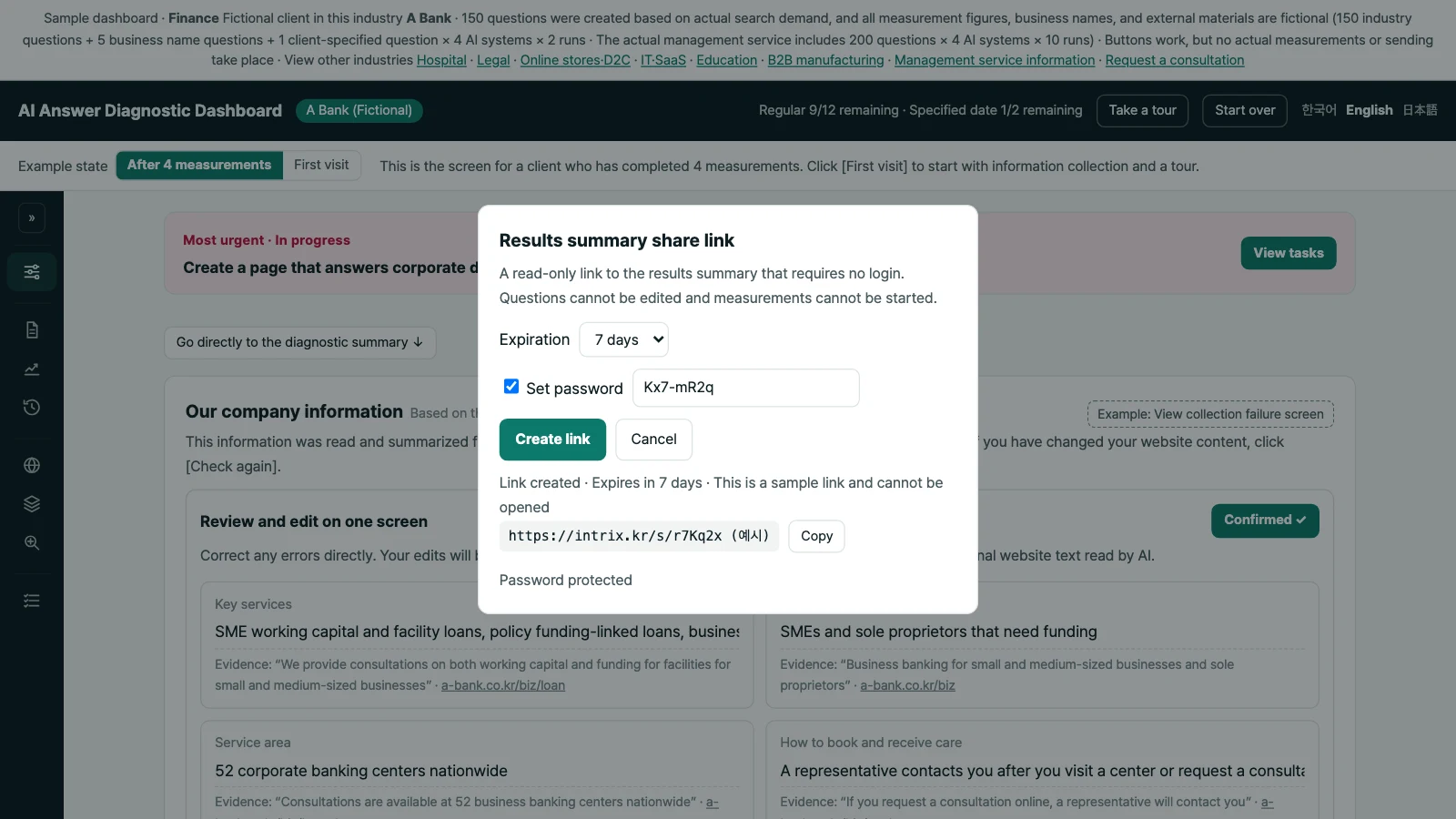
Intrix now lets you set a password for share links in your customer dashboard. Each link provides read-only access to one measurement round’s full report without a login. You can share results with another department or an external partner, choosing the round and sharing period without creating a new account.
Set a password when you create a link
When creating a share link, select “Set password” and enter a password of at least 8 characters. Anyone opening the link must enter the password to view the report. After a correct entry, the same device will not ask again for 12 hours.
Recipients can only read the full report for that round. They cannot edit questions or start a measurement. Choose the round you want them to review before sharing the link.
Keep the password separate from the link
Intrix does not store the original password and cannot show it to you again. If you forget it, create a new link. We recommend sending the link and password through separate channels.
Repeated incorrect password attempts temporarily block further attempts. This adds a password check before someone can open the report.
Keep using the 7-day limit and sharing controls
Share links remain available for 7 days from the day they are created. To end access sooner, select “Stop sharing” in the dashboard. Each link is created and disabled separately, so you can choose which link to stop sharing.
Password protection works alongside the existing time limit and sharing controls. When sending results, let recipients know how long the link will remain available.
Plan how to share your results
Use a share link when another department or an external partner needs to review a measurement round’s results without a new account. To discuss how to share reports from your dashboard, talk to Intrix.
Explore Intrix
More updates
AI Agent Run Check now includes Google and Anthropic families
Intrix adds Google-family and Anthropic-family agents to AI Agent Run Check, with separate report findings for user confirmation and human verification before submission.
New featureWebsite technical SEO and GEO checks have been significantly expanded
Review canonical URL errors, heading structure, visible breadcrumbs, and similar page content, with examples of pages to fix in First Check and Regular Compare reports.
New featureReview the evidence behind each improvement task
See confirmed and missing evidence for each task, distinguish recommendations from continued review, and decide what to check before starting work.
New feature